How to Talk to Your Coding Agent

I recently came across a tweet by Guillermo Rauch that sparked an interesting discussion:
@rauchg was arguing a ‘narrative violation’: AI coding might actually push us toward the most rigorously tested, type-checked & even provably correct code, because agents thrive on tight verification loops and don’t mind writing tons of tests (which reduces slop and boosts confidence).
This sentiment is gaining traction among developers who rely on tools like Claude Code, Cursor, and Codex to ship production code. But how much truth is there to this claim? To get a clear picture of what’s achievable with today’s tools,and how much more we can squeeze out of them,we need to look at the issues that continue to trip up these coding agents.
The Narrative Violation
Looking at this optimistically, there’s real substance to the argument. From our usage, we’ve seen how agents love todos and checklists. Give them a list, and they’ll immediately start checking off every item.
When it comes to testing, agents can produce more unit tests than most human developers,and they never get bored of it. Similarly, when proper verification loops are in place, agents show a solid ability to self-correct.
But the reality on the ground is more nuanced. The gap between potential and practice is still wide, and bridging it means understanding the core challenges.
The Core Problems
Context
Having the right context at the right moment remains one of the trickiest challenges in agentic development. Agents can only perform as well as the information we give them.
More often than not, these agents operate under context mis-management. Picture this: an agent finds itself deep in a TypeScript file, working through complex logic, while quietly running low on its context window. The architectural decisions, the reasoning behind certain patterns, the edge cases documented elsewhere,all of it fading from memory.
The system surrounding the agent often bears the responsibility here.
Environment
Agents thrive in well-defined environments, yet they rarely get one. The expectations we have for them are seldom clear or written down. What we think are obvious requirements often look like vague hints from the agent’s perspective.
This is why validation matters so much. Our inability to clearly express what we want is a big part of the problem,agents need clearer signals from us.
AI Fatigue
There’s a specific kind of tiredness that sets in when a coding agent loses its thread and drifts into “slop-land”,producing code that technically runs but misses the point. We call this AI Fatigue.
It comes from the constant vigilance needed to catch an agent before it wanders too far off track.
Context Management
The solution to chaos is structure. Here’s what we’ve built to bring order to the process.
The /context Folder
We’ve started organizing all context in a dedicated /context folder in every repository. This has worked well for keeping agent behaviour consistent across sessions.
At any given time, our /context folder might contain:
/plans, Roadmaps and feature planning documents/architecture, System design decisions and diagrams/decisions, A log of choices made and why- Other context markdown files as needed
Think of it this way: every line in the context folder helps organize a hundred lines of code elsewhere in the repository. The investment pays off.
Planning
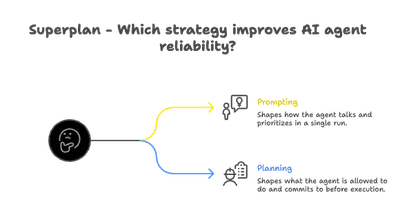
Planning with an agent might be the single best use of your time in agentic development. When you engage in structured planning, something interesting happens: the agent’s uncertainty about what you want finally gets a voice.
During planning, the agent can ask the questions that have been silently bugging it:
- “Should this component handle its own state, or receive it from a parent?”
- “Is backwards compatibility a constraint here?”
- “What happens when the API returns an empty array versus null?”
These questions, caught early, save you from bugs downstream. They’re lapses in shared understanding that could snowball if left unaddressed.
Course correction at the planning stage is cheap. During implementation, it’s costly. During debugging, it’s painful.
We save all planning documents in the /context folder, building up a record of the reasoning behind the codebase.
PRDs
Every engineer knows requirements documents matter. Yet few write them before small technical changes or feature work. It feels like too much overhead.
Here’s where LLMs shine: they never tire of writing requirements documents. Work through thorough planning with an agent, answer its questions, and you end up with a solid PRD.
We’ve been impressed by how much understanding gets captured in these documents. A good requirements doc sets a strong foundation for everything that follows.
Implementation Plans
There’s a temptation to hand an agent a PRD and say “build this.” After all, the requirements are listed,how hard could it be?
Turns out, quite hard. There’s a real gap between requirements and working software,one that engineers have been filling for decades. This gap shows up in agentic development too.
An effective implementation plan needs:
- Current state , What exists in the system today
- Required changes , What needs to change to meet the requirements
- Execution path , Which files to touch, in what order, with what changes
This level of detail might seem like overkill. In practice, it’s essential.
Task Lists
You might think a solid PRD and implementation plan is enough. But there’s still a challenge: adherence.
Consider two scenarios:
Scenario A: “Create a website about my cat.”
Minimal expectations, few constraints, high adherence. Ask for a cat website, get a cat website. Success.
Scenario B: Implement a complex feature with hundreds of specific behaviours and edge cases.
Here, the odds of the agent nailing every detail drop fast. The fix is decomposition: break the work into a task list where each item can be checked individually.
Agents excel at checking boxes. We just need to give them the right boxes.
Accountability
Structure alone isn’t enough. Accountability mechanisms keep standards consistent over time and across agent sessions.
decisions.md
A decision log is a git-tracked markdown file that records every significant decision an agent makes in a repository.
A typical entry looks like:
[2026-01-12 23:30] | Claude | FIX | Agent Chat | Fixed streaming display by deferring OPTIONS parsing until stream completes. Added `isStreaming` prop through component hierarchy to gate `parseAgentMessage` calls on the last assistant message.Why keep a separate decision log instead of relying on git commits?
- Git commits should be atomic units of code work
- Decision logs can be long, short, or skipped depending on what makes sense
- Decision logs are written for LLM readability
- Decision logs capture reasoning that might not warrant a commit but still matters
An agent starting fresh can scan the decision log and quickly understand recent work patterns and the thinking behind non-obvious choices.
gotchas.md
We’ve watched agents get completely derailed by unexpected data or patterns. They spend minutes,and thousands of tokens,debugging by going down the wrong rabbit hole.
Usually, the issue is sitting in plain sight. If the agent had just looked in the right direction, we’d have saved a lot of time and tokens.
gotchas.md exists for one purpose: getting agents to notice and log surprises.
The goal:
- Immediate reflection , When an agent hits something unexpected, it pauses and notes it
- Shared wisdom , That surprise gets documented for future agents
Over time, this file grows into a useful reference,showing where previous agents stumbled so future ones can avoid the same issues.
Ensuring Adherence
The best system is useless if agents don’t follow it. Enforcement means meeting agents where they live: in their config files.
README Rules
All rules and expectations go in the project’s README.md under a section: Repo Rules For AI Agents.
Every agent config file,CLAUDE.md, AGENTS.md, .cursorrules, etc.,contains a redirect that sends the agent to the README first:
# Claude Code: Read Context First

**STOP! Before doing anything, go here: [context/README.md](context/README.md)**

This project uses a structured context system. You MUST read it before starting any task.

## Why?

Without context:

- Waste tokens reading wrong files
- Miss critical patterns
- Create inconsistent code

With context:

- Find relevant files in 2-3 reads
- Follow established patterns
- Update docs after changes
- Work efficiently
INDEX.md
Inside the /context folder, an INDEX.md file lists all available context files with their titles and paths. This lets agents discover and load context as needed, rather than requiring everything upfront.
Structuring Context Documents
Consistent structure in context documents helps agents parse them faster. We recommend a minimal header:
# Analytics

**Location:** `/context/architecture/analytics.md`

**Last Updated:** 2026-01-10

**Purpose:** Document analytics tooling, tracking conventions, and event wiring

...rest of the document
This gives you:
- Title , What the document covers
- Location , Where it lives (useful for cross-references)
- Timestamp , How recent it is
- Purpose , A one-line summary to help prioritize reading
Keep it lightweight. Heavy templates discourage documentation.
Talking to Agents
When talking to an agent, one counterintuitive principle works well: don’t prompt.
Instead of crafting calculated, optimized prompts, try a brain dump. Share what you’re thinking, including how you got there. This helps the agent see your thought process, including the destination and the path.
A practical tip: don’t press backspace,especially when your thinking shifts mid-sentence. That visible change of direction helps an agent understand how you think.
This gets you as close as possible to thinking with an agent.
Wrapping Up
Coding agents don’t have to remain unpredictable. With the right structures,context management, accountability mechanisms, and communication practices,these tools can produce consistent, quality output.
The missing layer turns out to be a system: constraints and expectations that channel the agent’s capabilities in useful directions.
Implementing These Practices
These strategies can be adopted piece by piece, picking what fits your workflow. For teams wanting a complete solution, we’re building something more integrated.
Superplan.md is the planning layer for AI agents. It gives agents of all types a shared space to consolidate context, keeping behaviour consistent across tools and sessions.
Beyond context sharing, Superplan includes an MCP server that enforces plan adherence,making sure what’s documented is what gets built.
If this sounds useful, join the waitlist at https://superplan.md.
The gap is getting bridged. Will you be part of shaping what comes next?